
Uptime and status codes
The uptime check requests your page and records the HTTP status code it returns. That code tells you whether the page is online, blocked or broken. Uptime checks are free: they don't use credits and keep running even when your credits are used up.
By default the primary page is checked every 15 minutes.

What the status means
| Status | Colour | Meaning |
|---|---|---|
| 200 OK (any 2xx or 3xx) | Green | The page answered normally. The Dashboard shows this as Up. |
| 401 / 403 / 429 with a warning icon | Amber | Our check was blocked, usually by a firewall or bot protection. But the page loads in a real browser, and the other checks ran fine. |
| Other 4xx (for example 400 or 405) | Amber | The page returned an unusual response. Worth a look. |
| 5xx, 404, 410 | Red | The page is down or missing. The Dashboard shows this as Down. |
| Timeout, DNS error, SSL error, Refused, Unreachable | Red | Validator couldn't connect to the page at all. |
| — | Grey | No result yet. |
Check it now
Click Check next to Uptime on the website's page to check the primary page right away. It's free.
Uptime history
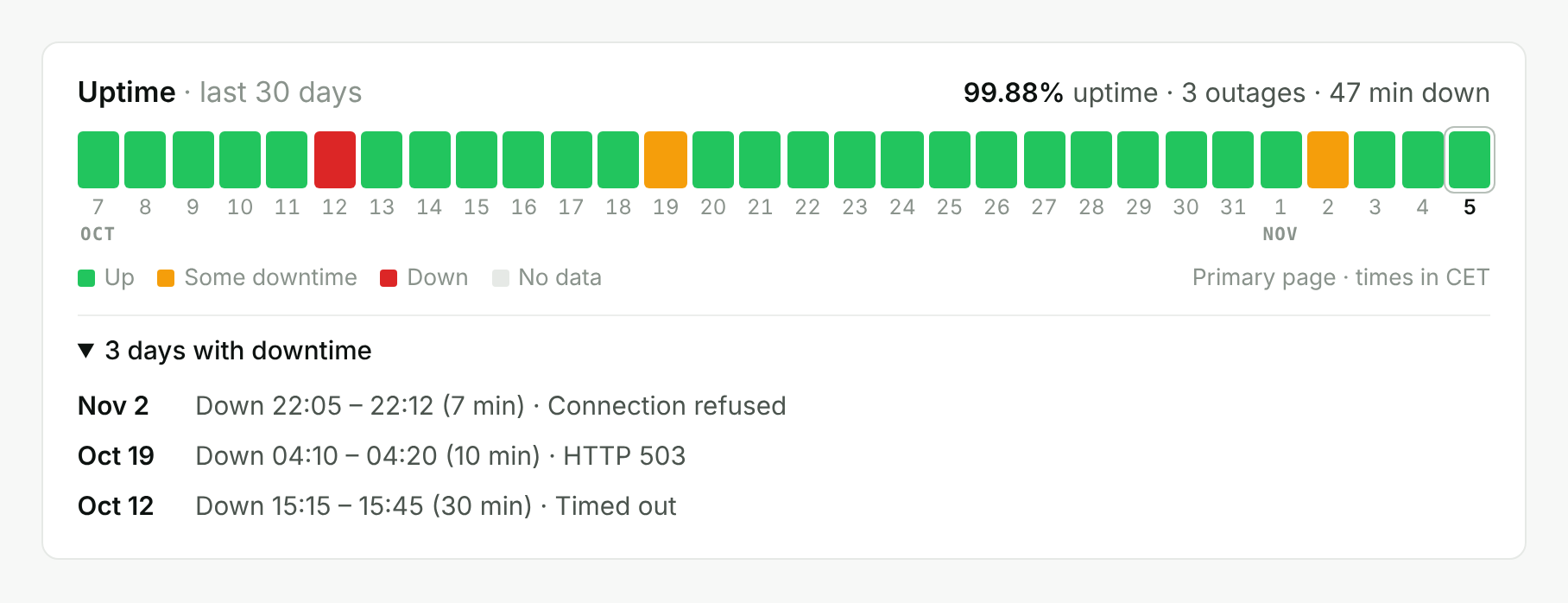
The website's page shows the primary page's last 30 days as a bar, one segment per day: up, some downtime, down or no data. Above it you see the uptime percentage and the number of outages. Hover a day to see its exact outage times. The history fills in day by day as checks run.
Common error codes
- 404 Not Found: the page doesn't exist. Check whether the URL changed.
- 500 Internal Server Error: something failed on the server, often a plugin or theme error.
- 502 / 503 / 504: the server or its gateway is overloaded, in maintenance or timing out.
- 520–526: Cloudflare errors. Cloudflare couldn't reach your server or its SSL.
- DNS error: the domain couldn't be found. Check your DNS settings and domain renewal.
- Timeout: the page took too long to respond.
False alarms
A single failed request isn't treated as downtime. Validator re-checks twice, about 30 and 60 seconds later, before sending a "site is down" email. When the site is back up, you get another email.
If a page doesn't load, Validator skips its PageSpeed, Accessibility and Page health checks for that run, so a page that's down uses fewer credits.
If your status shows an amber 403 but the site works, see My site shows as down, but it's online.